
What is Open in Kami?
Open in Kami allows users to take any webpage they are viewing in their browser and instantly open it in Kami as a PDF. With one click, web based content such as articles, blogs, research pages, and online resources can be converted into an interactive document where users can annotate, highlight, comment, read aloud, and more.
This makes it easy to move from passive web reading into active learning and instructional workflows without downloading files or switching tools.

How to use Open in Kami
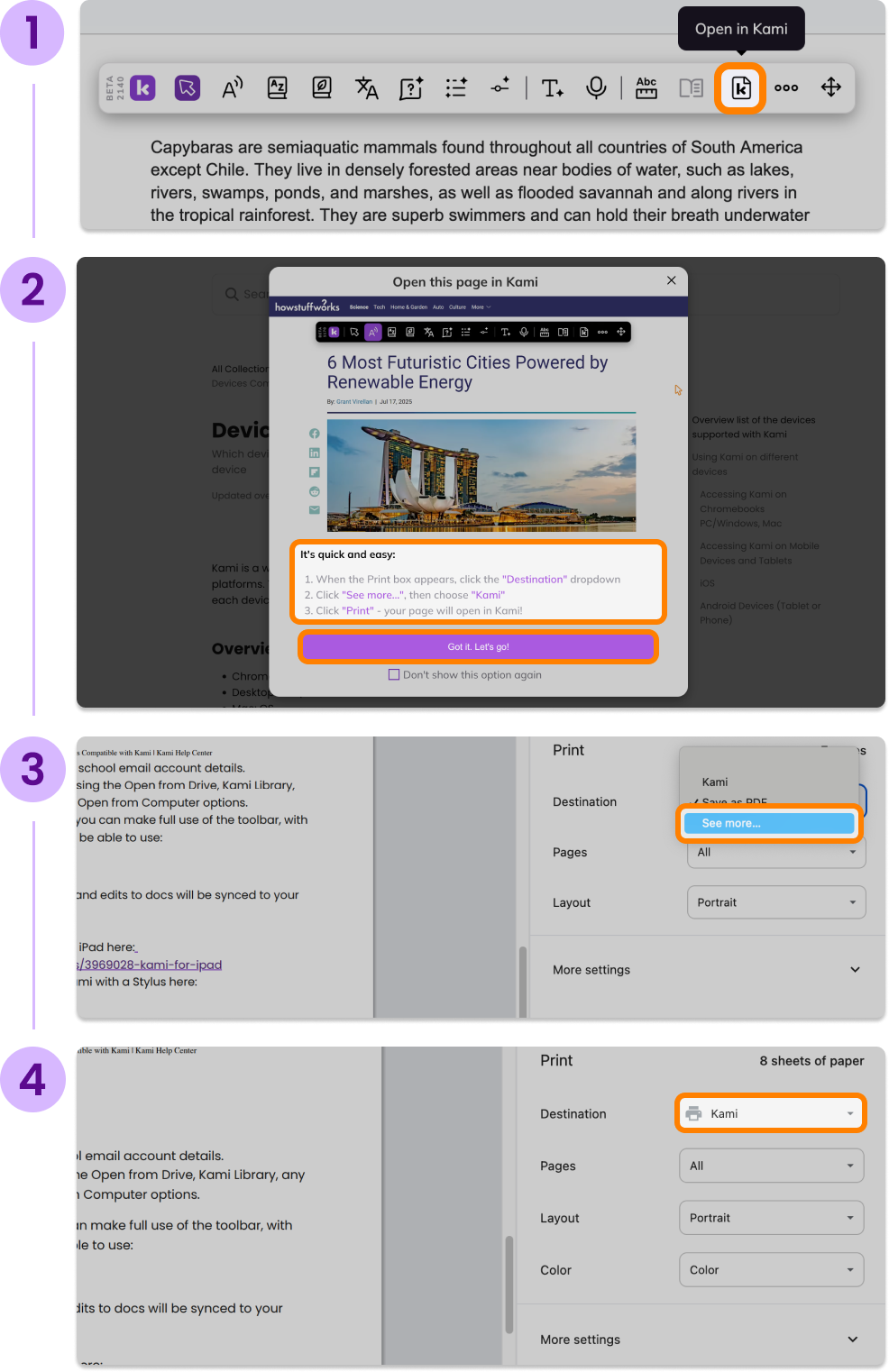
While viewing a webpage, click the Open in Kami button in the Companion toolbar.
A first time user modal will appear detailing how to easily Open in Kami.
Select the button at the bottom of the window to continue.
The print dialog will appear. Select the Destination dropdown, click See more and then choose Kami.
Click Print and the webpage will open in Kami as a PDF.
Once opened in Kami, you can use all standard Kami tools including annotation, comments, Read Aloud, text selection tools, and assignment sharing.